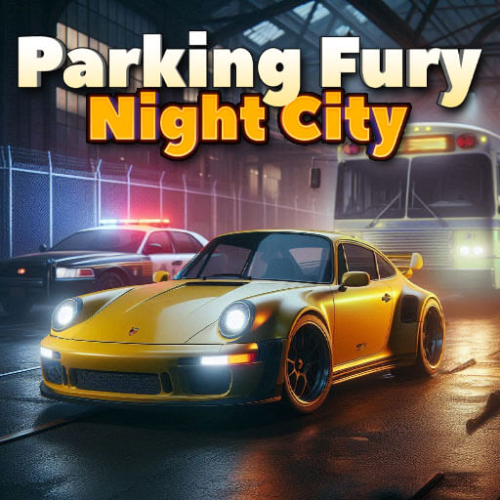
Parking Fury 3D: Night City
Listed Under:
Parking Fury 3D: Night City Game Controls:
Arrow keys to drive and balance. Press CRTL to enter cars. Follow the arrows from the mini-map to the destination.
Parking Fury 3D: Night City Review + Tips & Tricks by GplusGames.com:
Parking Fury 3D: Night City
Parking Fury 3D: Night City is a challenging 3D driving and parking game that puts you behind the wheel as you navigate a busy city after dark. Your mission is to drive through the streets, locate specific vehicles, and park them in the correct spaces without causing too much damage. With narrow roads, traffic, obstacles, and tight parking areas to deal with, getting from one location to another requires careful driving and good control.
Unlike traditional racing games, Parking Fury 3D: Night City focuses on precision rather than speed. You'll need to carefully steer around buildings, parked cars, barriers, and other hazards while searching for the correct destination. Each mission gives you a vehicle to drive and a parking objective to complete. Successfully finishing assignments requires patience, awareness, and the ability to control your car in confined spaces.
The nighttime city setting gives the game a distinctive atmosphere while making navigation more challenging. Streetlights, buildings, intersections, and other vehicles create a busy urban environment to explore. If you enjoy driving games that test your parking skills rather than simply asking you to race, Parking Fury 3D: Night City offers a fun and demanding browser experience.
How to Play
Your objective is to complete a series of driving and parking missions throughout the city. At the beginning of a mission, you'll need to find the vehicle you're supposed to drive and then follow the streets toward your destination. Pay attention to the directions and look for the designated parking area when you arrive.
Driving carefully is important because collisions can damage your vehicle and make completing the mission more difficult. Avoid hitting other cars, buildings, barriers, and objects along the road. When you reach the parking area, position the vehicle carefully and make sure it is inside the designated space before finishing the task.
Some missions require you to drive through busy sections of the city before reaching your destination. Take your time at intersections and when turning through narrow streets. The goal isn't necessarily to get there as quickly as possible; completing the mission successfully without excessive damage is much more important.
Game Features
- 3D driving and parking gameplay
- Nighttime city environment
- Multiple driving and parking missions
- Different vehicles to drive
- Realistic-style vehicle handling
- Narrow streets and challenging parking locations
- Traffic and obstacles to avoid
- Damage penalties for careless driving
- Third-person driving perspective
- Simple keyboard controls
- Playable directly in your web browser
- Great for players who enjoy driving and parking games
Tips & Strategies
The biggest mistake you can make in Parking Fury 3D: Night City is rushing. Driving at high speed makes it much harder to react to traffic, turns, and unexpected obstacles. Slow down when approaching intersections and narrow areas, and give yourself plenty of room when making turns.
When parking, don't try to force the vehicle into the space in one movement. Make small adjustments and use the camera to check your position. If you're approaching the parking space from an awkward angle, it can be easier to drive past it and reposition the vehicle rather than attempting a difficult turn.
Pay attention to the city streets as you travel. Learning how the roads connect can help you reach your destination more efficiently. However, don't sacrifice careful driving simply to save a few seconds.
When you're driving near other vehicles, leave yourself enough space to maneuver. Collisions can quickly turn an otherwise successful mission into a failed attempt. Smooth steering and controlled acceleration are usually more effective than constantly making large movements.
Controls
Desktop
- W / Up Arrow: Accelerate and drive forward.
- S / Down Arrow: Brake and reverse.
- A / Left Arrow: Steer left.
- D / Right Arrow: Steer right.
- Spacebar: Brake or use the handbrake when supported.
Controls may vary slightly depending on the browser version of the game.
Why You'll Love It
Parking Fury 3D: Night City offers something different from the typical browser racing game. Instead of rewarding players for crossing a finish line first, the game challenges you to drive carefully, navigate an urban environment, and park vehicles accurately. This makes every mission a test of patience, precision, and vehicle control.
The 3D city environment also gives you plenty to pay attention to while driving. You need to watch the road, avoid other vehicles, follow the correct route, and prepare for your final parking maneuver. A simple-looking assignment can become surprisingly difficult when you're trying to avoid damaging the vehicle along the way.
If you enjoy parking simulators, driving games, car games, or challenges that require careful control, Parking Fury 3D: Night City is a great browser game to try. It's easy to understand but takes practice to master, especially when the parking spaces become tighter and the city streets become more difficult to navigate.
Frequently Asked Questions
What is Parking Fury 3D: Night City?
Parking Fury 3D: Night City is a 3D driving and parking game where you complete missions by driving vehicles through a nighttime city and parking them at designated locations.
How do you play Parking Fury 3D: Night City?
Drive through the city, locate the vehicle assigned to you, follow the route to your destination, and carefully park in the designated area. Avoid collisions and other obstacles while completing each mission.
Is Parking Fury 3D: Night City a racing game?
While the game involves driving, it is primarily a parking and driving challenge rather than a traditional racing game. Careful navigation and accurate parking are more important than reaching your destination at maximum speed.
What are the controls for Parking Fury 3D: Night City?
Most browser versions use the W, A, S, and D keys or the arrow keys to control the vehicle. These keys allow you to accelerate, brake, reverse, and steer.
How can I avoid damaging my vehicle?
Drive at a controlled speed, especially around corners and in tight areas. Give other vehicles plenty of room and make small steering adjustments when parking. Taking your time is usually the best way to avoid unnecessary collisions.
Is Parking Fury 3D: Night City difficult?
The basic controls are easy to learn, but the missions can become challenging as you encounter tighter parking areas, more complicated routes, and additional obstacles. Practicing smooth steering and careful positioning will help you improve.
Can I play Parking Fury 3D: Night City in a browser?
Yes. The browser version can be played directly on a compatible device without requiring a traditional game installation.
Conclusion
Parking Fury 3D: Night City is a fun browser driving game for anyone who enjoys cars, parking challenges, and precision-based gameplay. The combination of 3D graphics, nighttime city streets, multiple missions, and tight parking spaces creates a driving experience where careful control matters more than raw speed.
Take control of your vehicle, navigate the city, avoid traffic and obstacles, and complete each parking assignment without causing unnecessary damage. If you think you have the patience and driving skills to handle the city's toughest parking challenges, start your engine and see how many missions you can complete.
No Gameplay Yet — Watch Something Similar!
Gameplay, quick guides, and reviews recorded for GplusGames.com