Police Car Real Cop Simulator
Listed Under:
Police Car Real Cop Simulator Game Controls:
W / A / S / D: Move and navigate the environment; use these keys to drive and steer the car. Mouse: Look around and aim. Left Mouse Button: Shoot or attack. Right Mouse Button: Aim. Mouse Scroll Wheel: Change weapons. Spacebar: Jump while on foot. Left Shift: Run on foot or use the driving boost where supported. F: Enter or exit a vehicle. E: Start the vehicle's engine. H: Turn the police siren on or off. R: Reload your weapon. Q: Interact or handle an available interaction. 1 / 2 / 3: Change weapons. C: Change the camera view, where supported. M: Open the map, where supported. P / Esc: Open the pause menu. L: Lock or unlock the mouse cursor. F11: Toggle browser fullscreen, where supported.
Police Car Real Cop Simulator Review + Tips & Tricks by GplusGames.com:
```html
Police Car Real Cop Simulator
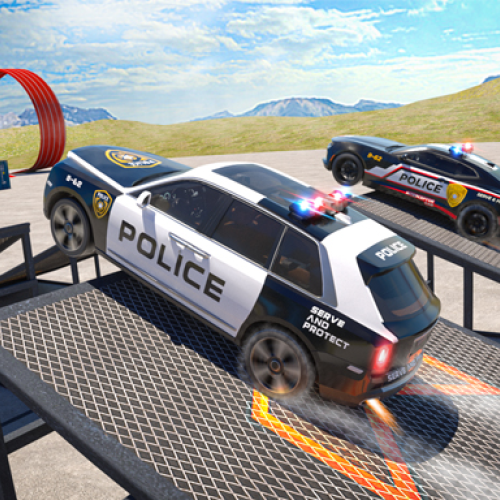
Put on your badge, start your engine, and take to the streets in Police Car Real Cop Simulator, a 3D police action and driving game that lets you experience life on the force. Patrol a large city environment, respond to different assignments, chase down criminals, and help keep the streets under control. With modern police vehicles, missions to complete, and the freedom to explore on foot or behind the wheel, there's more to this game than simply driving with the siren on.
Your duties can take you from routine driving and parking tasks to high-speed pursuits and encounters with troublemakers. Follow the map to find your next objective, learn to handle your police car, and decide when to use the siren to get through traffic. When a mission requires you to leave the vehicle, you can step out and continue on foot.
As you progress, you can earn in-game rewards and work toward unlocking additional police cars. Whether you enjoy open-world driving, action games, or the challenge of completing different assignments, Police Car Real Cop Simulator gives you plenty of ways to put your skills to the test.
How to Play
Begin by getting familiar with the city and the controls. Use the keyboard to move around, drive your police car, and navigate the environment. Follow the map to locate mission objectives and pay attention to the instructions for each assignment.
Some missions require you to chase criminals or stop offenders, while others involve careful driving and parking. Keep your vehicle under control, use the camera controls to improve your view, and activate the police siren when appropriate. You can enter and exit vehicles as needed, giving you the flexibility to handle situations both on foot and behind the wheel.
Complete assignments to earn rewards and look for opportunities to upgrade your police car collection. If you get stuck or your vehicle ends up in a difficult position, use the reset control to get back on track.
Game Features
- 3D Police Simulation: Explore a city environment while taking on the responsibilities of a police officer.
- Open-World Exploration: Travel through the streets and discover different areas of the game world.
- Police Driving: Drive patrol cars, navigate roads, and respond to assignments around the city.
- Varied Missions: Take on pursuits, criminal apprehension tasks, parking challenges, and other objectives.
- On-Foot Action: Leave your vehicle when necessary and move around the environment on foot.
- Multiple Police Vehicles: Earn rewards and work toward unlocking additional cars.
- Police Siren: Activate your siren as you patrol or respond to a situation.
- Camera Options: Change your viewpoint to help with driving and navigating the environment.
- Action Elements: Some encounters include aiming, shooting, and changing weapons.
- Free Browser Gameplay: Play the game online without needing a separate traditional game installation.
Tips & Strategies
Learn the Controls First: Before rushing into a pursuit, practice steering, braking, changing the camera, and entering or exiting your vehicle. Knowing the controls makes it easier to react when a mission gets complicated.
Use the Map: Check the map when you're unsure where to go. Following the route toward your objective can save time and help you avoid wandering around the city unnecessarily.
Keep Your Speed Under Control: Driving flat out may seem like the fastest way to reach a target, but sharp turns and crowded streets can make high speeds difficult to manage. Slow down when you need to make a precise maneuver.
Choose the Right Camera View: If your current view makes it difficult to judge a corner or line up your car, switch the camera. A better angle can help you navigate tight spaces and stay aware of your surroundings.
Use the Siren When Needed: The siren is one of your main police tools. Learn its control and use it when responding to assignments where you need to signal your presence.
Remember You Can Get Out of the Car: Not every situation needs to be handled from behind the wheel. If an objective calls for on-foot movement, use the enter/exit control and continue the mission outside your vehicle.
Reset When Necessary: If your car becomes stuck or ends up in an awkward position, try the reset control rather than wasting too much time trying to recover manually.
Complete Missions to Earn Rewards: Focus on finishing assignments to collect in-game rewards. These can help you work toward unlocking more police vehicles and expanding your options.
Controls
Desktop
- W / A / S / D: Move and navigate the environment; use these keys to drive and steer the car.
- Mouse: Look around and aim.
- Left Mouse Button: Shoot or attack.
- Right Mouse Button: Aim.
- Mouse Scroll Wheel: Change weapons.
- Spacebar: Jump while on foot.
- Left Shift: Run on foot or use the driving boost where supported.
- F: Enter or exit a vehicle.
- E: Start the vehicle's engine.
- H: Turn the police siren on or off.
- R: Reload your weapon.
- Q: Interact or handle an available interaction.
- 1 / 2 / 3: Change weapons.
- C: Change the camera view, where supported.
- M: Open the map, where supported.
- P / Esc: Open the pause menu.
- L: Lock or unlock the mouse cursor.
- F11: Toggle browser fullscreen, where supported.
Note: Some controls vary between versions and hosting sites. Check the in-game instructions if a key does not behave as expected.
Mobile
This version is primarily designed for desktop play with a keyboard and mouse. Touchscreen compatibility may vary depending on the browser and game version, so a desktop or laptop is recommended for the most reliable control experience.
Why You'll Love It
Police Car Real Cop Simulator combines driving, exploration, and action in one game. Instead of repeating a single race or completing identical levels, you can explore the city, switch between driving and on-foot movement, and tackle assignments with different objectives. The combination of police vehicles, map navigation, pursuits, and equipment gives each session several things to try.
It's also a good fit for players who enjoy open-world driving games but want more to do than cruise around the streets. You can practice your driving, learn the layout of the environment, complete missions, and work toward unlocking additional vehicles. If you like police games, car simulators, and action adventures, this is a fun way to take command of your own virtual patrol.
Frequently Asked Questions
What is Police Car Real Cop Simulator?
Police Car Real Cop Simulator is a 3D browser game that combines police driving, open-world exploration, missions, and action. You play as an officer who patrols the city and takes on assignments involving criminals and other incidents.
What is the main objective?
Your goal is to complete the missions available in the game. These can involve driving, chasing suspects, stopping offenders, and handling other police-related tasks.
Can you get out of the police car?
Yes. You can enter and exit vehicles and explore on foot when the situation calls for it.
How do you turn on the police siren?
On the commonly listed desktop controls, press H to turn the police siren on or off.
Can you unlock other police cars?
Yes. The game includes additional police vehicles that you can work toward unlocking by earning in-game rewards.
Does the game include weapons?
Yes. Some versions include action sequences with weapons, aiming, and shooting. The available equipment and controls may vary slightly depending on the version you're playing.
Can you play Police Car Real Cop Simulator on mobile?
The game is primarily designed for desktop play with a keyboard and mouse. Mobile support is not consistent across hosting sites, so check the game page and its controls before playing on a phone or tablet.
Do you need to download the game?
No traditional game download is required. You can play the browser version directly on a supported website, although the game may need time to load before you begin.
Conclusion
Police Car Real Cop Simulator puts you in charge of a virtual police patrol, with city driving, criminal pursuits, on-foot exploration, and missions to complete. Learn the controls, follow the map, keep your vehicle under control, and use the tools available to handle each assignment. Whether you're chasing a suspect or working toward a new police car, there's always another task waiting on the streets. Start your engine, switch on the siren, and see how you handle life as a virtual cop!
No Gameplay Yet — Watch Something Similar!
Gameplay, quick guides, and reviews recorded for GplusGames.com