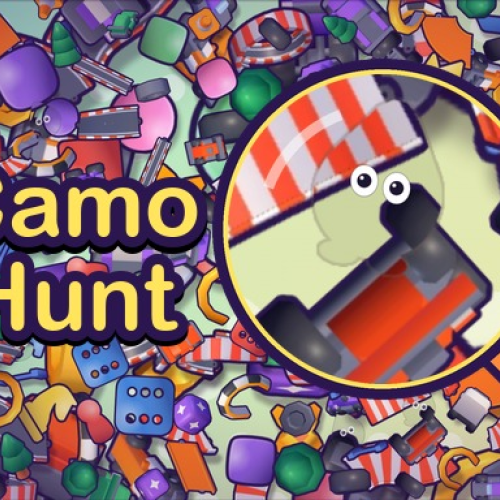
Camo Hunt
Listed Under:
Camo Hunt Game Controls:
Mouse Click and Drag: Move around the scene. Mouse Wheel: Zoom in and out. Left Mouse Button: Click a hidden Splotch to catch it. Plus (+) and Minus (-): Zoom in and out. Arrow Keys or W, A, S, D: Move around the scene. P: Pause the game. 1: Use the Magnifier hint. 2: Use the Eye-Ping hint. 3: Use the Freeze hint.
Camo Hunt Review + Tips & Tricks by GplusGames.com:
Camo Hunt
Think you have a sharp eye for detail? Put your observation skills to the test in Camo Hunt, a colorful hidden-object puzzle game where the characters you're searching for are experts at blending into their surroundings. Tiny creatures called Splotches hide among furniture, plants, decorations, and other objects, making them surprisingly difficult to spot. Your mission is to scan each scene, uncover every cleverly concealed hider, and finish the hunt before time runs out.
At first glance, a room or garden might look completely ordinary. Look closer, though, and you may notice a pair of blinking eyes or a shape that doesn't quite belong. You'll need to examine the scenery carefully, move around to inspect different angles, and zoom in on suspicious details. Finding the hidden characters is only half the challenge; avoiding incorrect clicks is important, too, because mistakes cost valuable time.
Camo Hunt offers multiple worlds and levels to explore, along with additional ways to play, including a Daily Hunt and an endless mode. You can also collect different character skins and share a special code that lets a friend try to find your hidden character. If you enjoy hidden-object puzzles, visual brainteasers, and games that reward patience and attention to detail, get ready to start searching!
How to Play
Your objective is to find all the hidden Splotches in each scene before the timer expires. These little characters camouflage themselves by matching the colors, shapes, and patterns of objects around them. A character might be hiding in plain sight, disguised against a wall, tucked among plants, or blended into a busy arrangement of decorations.
Move around the scene to inspect different areas, then zoom in when something looks suspicious. Pay special attention to small details, unusual outlines, and pairs of eyes that appear briefly. When you spot a hider, click or tap it to catch it and continue searching for the remaining characters.
Be careful with your selections. Clicking the wrong object costs a few seconds, which can make the final moments of a level much more difficult. If you get stuck, use the available hints to help narrow down the search. Complete the required hunts to progress through the levels, or try other modes for a different challenge.
Game Features
- Hidden-Object Gameplay: Search detailed scenes for characters that camouflage themselves against their surroundings.
- Five Worlds: Explore different environments, each offering new places for the Splotches to hide.
- 100 Standard Levels: Work through five worlds with 20 levels each.
- Zoom and Explore: Move around the scene and magnify areas to inspect small details more closely.
- Time-Based Challenges: Find the hidden characters before the countdown reaches zero.
- Helpful Hints: Use tools such as the Magnifier, Eye-Ping, and Freeze hints when a hider proves especially difficult to find.
- Daily Hunt: Return for a daily searching challenge.
- Endless Mode: Keep testing your observation skills in a mode designed for extended play.
- Halloween Event: Enjoy a seasonal event alongside the regular hunting challenges.
- Collectible Skins: Discover different looks for the game's hidden characters.
- Shareable Hide-and-Seek: Generate a code that allows a friend to try to find your hidden character.
- Mouse, Keyboard, and Touch Controls: Search using the input method supported by your device.
Tips & Strategies
Look for the Eyes: One of the most useful clues is a pair of tiny eyes. Hidden Splotches may blink occasionally, so watch for brief movements or details that seem out of place.
Scan in an Organized Pattern: Instead of randomly clicking around, divide the scene into sections. Search from left to right, top to bottom, or work through one corner at a time. A systematic approach helps prevent you from overlooking an area.
Zoom In on Suspicious Details: If an object looks slightly unusual, magnify it. A hidden character may have almost the same color as the background, and zooming in can make its outline easier to recognize.
Move Around the Scene: Don't rely on a single viewpoint. Drag to explore different parts of the environment and inspect objects from another angle when possible.
Watch the Timer: You need to balance careful searching with speed. Spend a little time examining difficult areas, but avoid lingering too long on objects that show no promising clues.
Avoid Random Clicking: Wrong selections cost seconds. Before clicking, look for a recognizable shape, a pair of eyes, or a color pattern that doesn't match the surrounding object.
Use Hints Strategically: If you have searched an area thoroughly without success, consider using a hint rather than wasting too much time. Save your available assistance for the most difficult moments.
Remember Common Hiding Spots: Furniture, garden decorations, plants, and other visually busy areas can provide excellent camouflage. Check these places carefully, but don't assume every hider is tucked into an obvious hiding spot.
Controls
Desktop
- Mouse Click and Drag: Move around the scene.
- Mouse Wheel: Zoom in and out.
- Left Mouse Button: Click a hidden Splotch to catch it.
- Plus (+) and Minus (-): Zoom in and out.
- Arrow Keys or W, A, S, D: Move around the scene.
- P: Pause the game.
- 1: Use the Magnifier hint.
- 2: Use the Eye-Ping hint.
- 3: Use the Freeze hint.
Mobile
- Touch and Drag: Move around the scene.
- Pinch: Zoom in and out.
- Tap: Catch a hidden Splotch when you find one.
Why You'll Love It
Camo Hunt turns the familiar hidden-object concept into a lively game of camouflage and close observation. The characters are designed to blend into their environments, so the answer isn't always obvious even when you're looking directly at the right area. Every scene encourages you to slow down, notice small details, and question whether an ordinary-looking object might actually be hiding something.
The timer adds just enough pressure to keep you focused, while the zoom feature and hints give you tools to tackle especially tricky searches. With multiple worlds, a large collection of standard levels, and extra modes such as the Daily Hunt and endless play, there's more to explore than a single round of finding hidden objects.
It's also easy to understand and play. You don't need complicated combinations or a long tutorial to get started; simply explore, look closely, and click the characters you discover. If you enjoy observation games, visual puzzles, and the satisfaction of spotting something that everyone else might miss, Camo Hunt is a fun challenge to add to your browser-game list.
Frequently Asked Questions
What is Camo Hunt?
Camo Hunt is a hidden-object puzzle game in which small characters called Splotches disguise themselves by matching the scenery. You must locate them all before the timer runs out.
How do you find the hidden characters?
Carefully examine the environment, look for unusual outlines or blinking eyes, and zoom in on suspicious areas. Moving around the scene can also help you notice details that are easy to miss at first.
How many levels are in Camo Hunt?
The standard game features five worlds with 20 levels each, giving you 100 regular levels to work through.
What happens if I click the wrong object?
An incorrect selection costs a few seconds. Try to identify a likely hidden character before clicking so you don't waste valuable time.
Does Camo Hunt have hints?
Yes. The game includes helpful tools such as the Magnifier, Eye-Ping, and Freeze hints. These can assist you when a character is difficult to locate.
Can I play Camo Hunt without completing the regular levels?
In addition to the standard levels, Camo Hunt offers other ways to play, including a Daily Hunt and an endless mode. The available options depend on the version and menu presented by the game.
Can I play Camo Hunt on a phone or tablet?
Yes. The game supports touchscreen-style controls in compatible versions. You can drag to move around, pinch to zoom, and tap a hidden character to catch it.
Is Camo Hunt a multiplayer game?
The main hidden-object challenge can be played solo. The game also offers a sharing feature that lets you create a code for a friend to try to find your hidden character.
Conclusion
Camo Hunt is a clever hidden-object puzzle that challenges you to spot tiny characters hiding in plain sight. Explore colorful rooms and gardens, zoom in on suspicious details, and keep an eye out for blinking eyes as you race against the clock. With multiple worlds, daily challenges, helpful hints, and plenty of camouflage to uncover, each hunt gives you another opportunity to sharpen your observation skills. Start searching, catch every Splotch, and prove that nothing escapes your notice!
No Gameplay Yet — Watch Something Similar!
Gameplay, quick guides, and reviews recorded for GplusGames.com